
The Worklog Approvals page lets you review and approve individual time entries (worklogs) across projects and teams — with full flexibility to filter, group, and bulk process them.
🔍 When to use Worklogs Approvals
Use this page when you want to:
-
Approve or reject specific time entries
-
Review time across multiple projects or users
-
Filter by date range, project, user, or status
-
Make bulk approval decisions quickly
👉 Think of it as flexible, detailed approval control
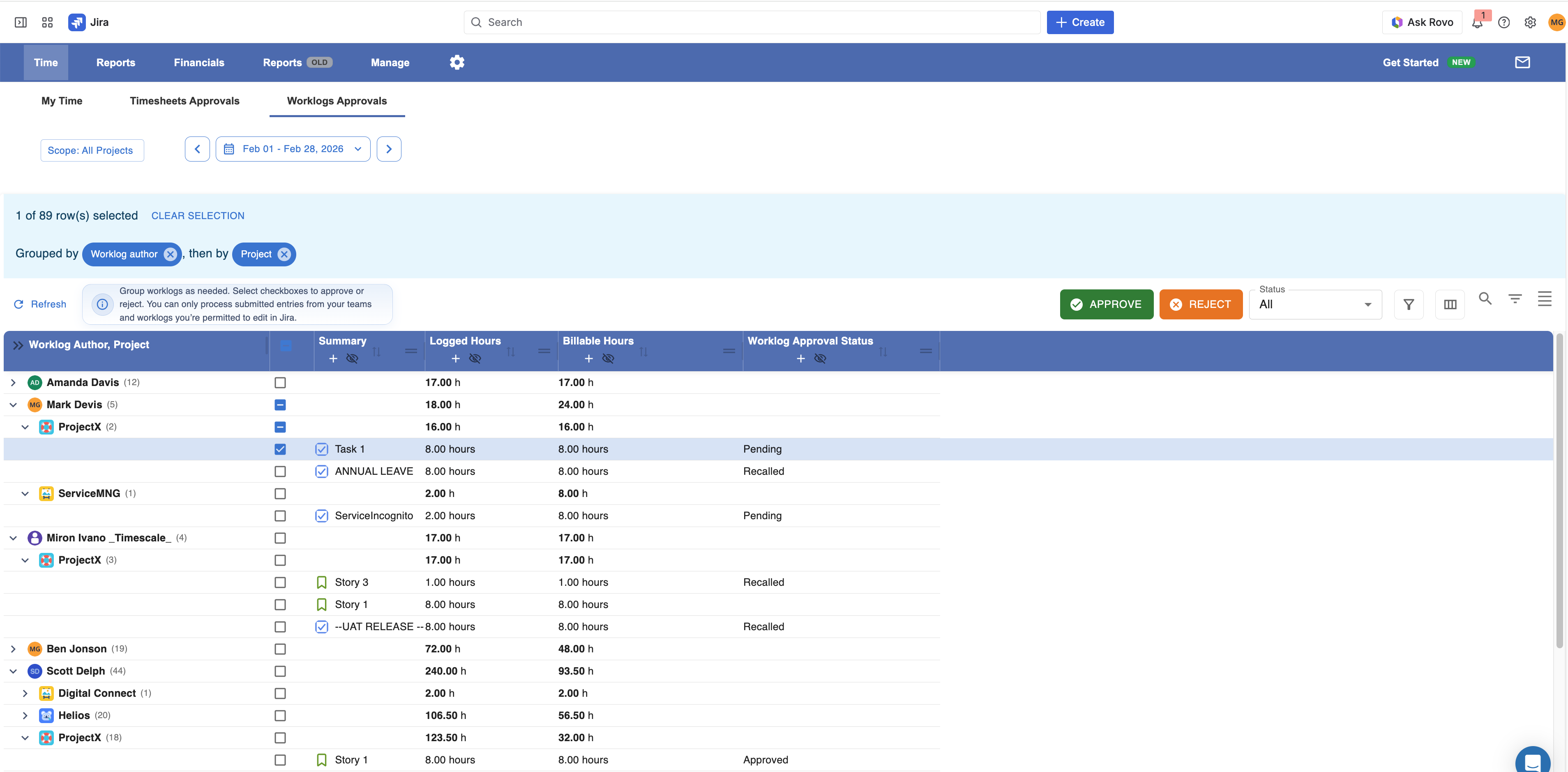
🧭 Step-by-Step Guide
1. Select Scope
Start by choosing:
-
Projects
-
Time range
This defines which worklogs will be loaded.
2. Review & Organize Worklogs
Once loaded, you can:
-
Group entries (by user, project, issue, etc.)
-
Filter results (e.g. only pending,)
-
Scan time entries before taking action
3. Select Worklogs
Use the checkboxes to:
-
Select individual entries
-
Or select multiple entries in bulk
4. Approve or Reject
With selected entries, choose:
-
✅ Approve
-
❌ Reject
You can process:
-
Single entries
-
Entire grouped sets
5. Track Status
After action, the Approval Status column updates:
-
Submitted → Approved
-
Submitted → Rejected
This gives instant visibility into what’s been processed.
⚠️ Important Notes
-
Only submitted worklogs from your team memebers can be approved or rejected
-
You can only process entries for:
-
Users in your teams
-
Or you are Super Approver (set in settings)
-
-
Bulk actions apply to all selected entries
🔄 Worklog Approvals vs Timesheet Approvals
These two pages serve different approval styles:
📊 Worklog Approvals (This Page)
-
Approve individual time entries
-
Flexible filtering & grouping
-
Best for:
-
Detailed review
-
Cross-project oversight
-
Finance / operations control
-
👉 Granular approval
📅 Timesheet Approvals
-
Approve entire timesheets (per user & period)
-
Review all entries together
-
Best for:
-
Weekly approvals
-
Team-level validation
-
👉 High-level approval
🧠 Simple Way to Think About It
-
Timesheets Approval = “Approve the person’s week”
-
Worklogs Approval = “Approve the actual work entries”
💡 Pro Tip
Use Worklogs Approvals when:
-
You need accuracy before invoicing
-
You want to validate billable vs non-billable work
-
You need tighter control over project budgets