
The utilization rate measures the percentage of an employee’s available working hours that are spent on work. It is a key performance indicator (KPI) used to track efficiency, productivity, and profitability. Employee utilization also examines how much time is dedicated to work that can be charged to clients(billable hours your team is delivering.).
Timescale Provides this information under the “Utilization page”
To see that:
-
Go to Timesclae
-
Select “Utilization” from the Timescale side menu
-
Select the data range for which you want to see the utilization rates
-
Select the Timescale Team or Jira group for which you want to see the utilization rate
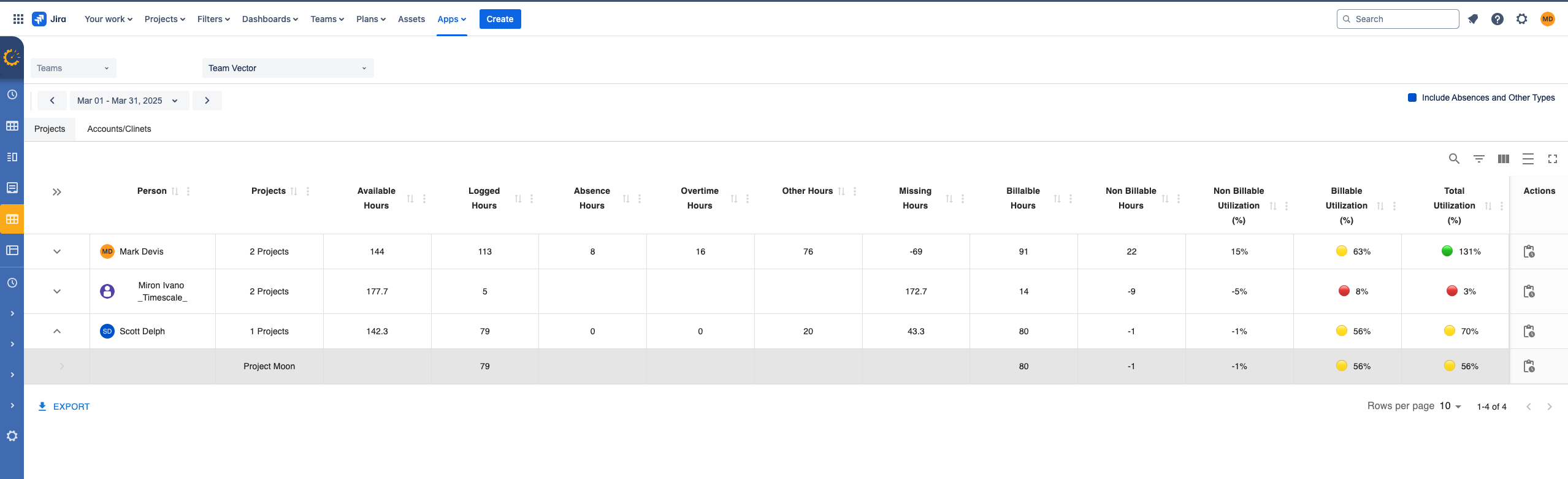
This overview provides an unique view on what and how your teams spents their time
Columns:
-
Person: These are the members of the selected Team or Jira groups
-
Projects: Presents the logged time distributed in to Jira projects
-
Available Hours: These are the Working/Available Hours you have set for each team member. If not set it will take the default working hours of the month.
-
Logged Hours: Total logged hours for the selected period
-
Absence Hours: These are all the logged hours towards Vacations/PTOs activities (To include this a check box on the screen needs to be selected). Check how to set up does
-
Overtime Hours: Logged time on Overtime Activities (To include this a check box on the screen needs to be selected). Check how to set up does
-
Other Hours: These are all the remaining hours that have been logged on Non Jira Activities
-
Missing hours: (available hours - all the logged hours) Provides a great overview who still needs to log hours
-
Billable hours: All the billable hours for that person/project for that period.
-
Non Billable hours: (total logged hours - billable hours)
-
Non Billable Utilization : (Non Billable hours / Available Hours ) x 100
-
Billable Utilization : (Billable hours / Available Hours ) x 100 Healthy is to be above 70%
-
Total Utilization: (Logged Hours + Absence Hours + Overtime Hours + Other Hours) / Available Hours) x 100
-
Actions. To see details hours on how time is spent towards Jira issues/items