
Non Jira activities are activities that your organization needs to account for, such as vacation, sickness, parental leave, or scheduled medical leave. They can also be used to track time spent on company meetings and events, onboarding, and internal training. Also they can be extra billable activities that you need. Basically you can create any type of non Jira Issue Activities
They meant to be available for all employees in the organization, so to make sure that everyone can view and log time to these activities
Non Jira activities are not used for public holidays. To do that, you must set up https://timescale-march2024.atlassian.net/wiki/external/OTg3NzQ2OTMwYzAzNGVjMmJiYjIwMTI4OTQ0YjhkYjY
-
Non Jira activities that are billalbe for the moment are not added in the Utilization report.
Creating non Jira Issue activities
To create:
-
Select Non Jira Activities in the Timescale sidebar
-
Select Add Activity.
-
Add Name ,ex:Vacation/Overtime/Daily Meeting/Trip to LA and Unique key.
-
Select the type of activity,
-
Can be Absence for things like Vacation, Sick,
-
Overtime
-
Other, for any other random non Jira activity
-
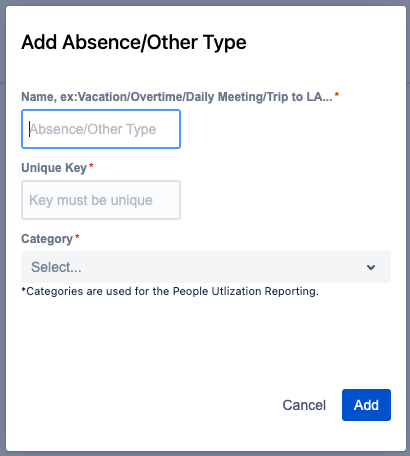
When generating People Utilization report these types of activities will be taken into account. Logged hours for each non Jira activities will be categorized under those types in separate column