
Managers can review, approve, or reject submitted timesheets, and leave feedback for their team members. This helps ensure logged time is accurate and ready for reporting, billing, or payroll.
If your organization is using timesheet approvals, team members must submit their timesheet for approval at the end of the timesheet approval period to approvers. This approvers is often the team lead/manager for the team in which the employee is a member
When a team member submits their timesheet for approval, a notification email is sent to the reviewer.
Where to review timesheets
-
Navigate to Time → Approvals in the main menu.
-
You’ll be prompted to select a team.
View team timesheet status
After selecting a team, you’ll see a list of all users in that team, along with their timesheet status for the selected period (week or month), for example:
-
Not submitted
-
Submitted
-
Approved
-
Rejected
This overview allows you to quickly spot:
-
pending timesheets
-
missing submissions
-
already approved or rejected entries
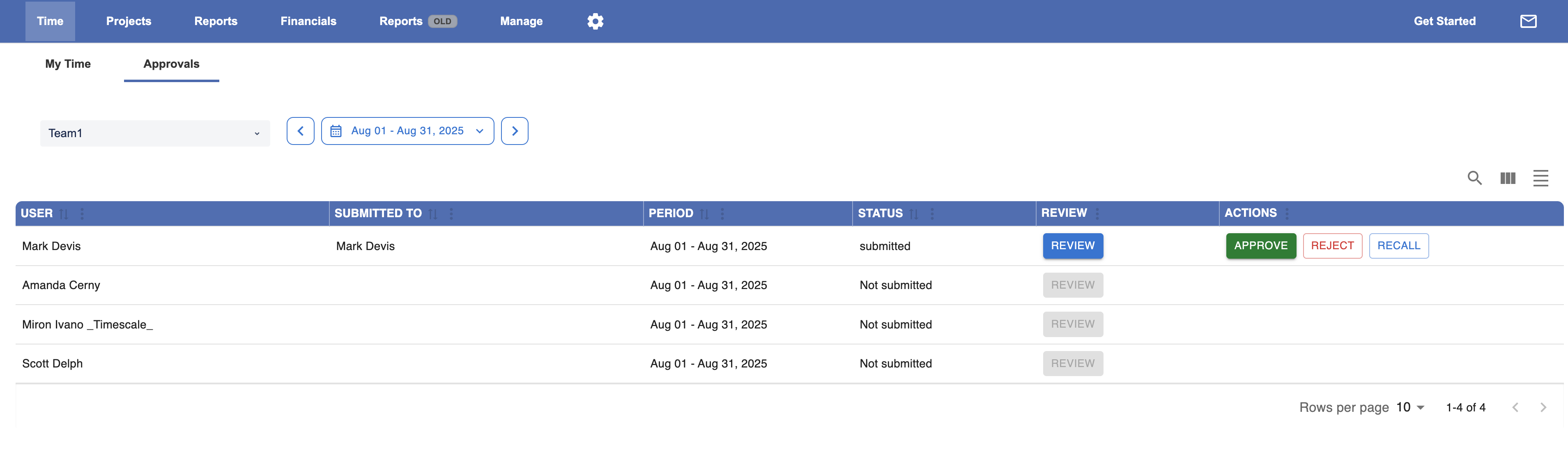
Review a user’s timesheet in detail
-
Click Review next to a user.
-
The detailed timesheet view opens, showing:
-
all logged worklogs
-
dates and issues
-
From here, you can verify whether the logged time is complete and correct.
Approve, reject, or recall a timesheet
From the review screen, you have the following options:
-
Approve
-
Approves the entire timesheet.
-
All worklogs in that timesheet receive the status Approved.
-
An approval timestamp is recorded and who approved it.
-
-
Reject
-
Rejects the timesheet.
-
You can leave a comment explaining what needs to be corrected.
-
The user will be able to update and resubmit their timesheet.
-
-
Recall
-
Reopens an already submitted timesheet.
-
Useful if approval was started by mistake or additional review is needed.
-
What happens after approval
-
Every worklog in the approved timesheet is marked with:
-
Approval status
-
Approval timestamp
-
-
These fields become available in:
-
the Reports section
-
exports (Excel / CSV)
-
This allows finance and management teams to:
-
filter or group by approval status
-
ensure only approved time is used for billing or invoicing
-
audit who approved time and when
Why this matters for managers
-
Prevents unreviewed or incorrect time from reaching reports
-
Creates a clear approval trail
-
Improves accuracy for billing, payroll, and utilization reporting
-
Reduces back-and-forth with teams at month end