
Tempo Timesheet application stores some part of worklogs in its own database. These parts are;
-
Worklog author
-
Worklog description
-
Worklog attributes
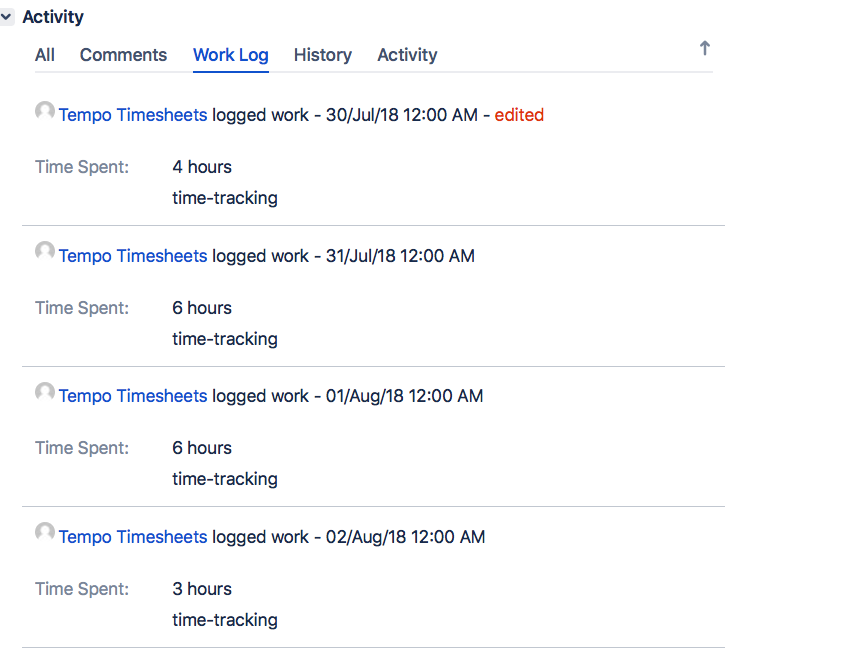
When you migrate from Tempo to another timesheet app, all when you view the worklogs through Jira’s own UI or REST API, all these information will be missing. Since attributes are Tempo specific information, it will not be visible at all in other apps or in Jira UI. This is something expected. But losing worklog author and worklog description is not something most people expect. Worklog author will be always displayed as “Tempo Timesheet”, and work description will be always displayed as “time-tracking”. In short, you will lose actual value of worklog author and worklog description. This misrepresentation can cause issues in reporting, accountability, and overall data management within Jira. As discussed in the Atlassian Developer Community thread titled "Unable to get user worklogs using Jira API when Tempo is installed", other developers have faced similar challenges when trying to retrieve accurate user work logs via the Jira API when Tempo is installed.
Here is how the Jira work logs look like after migrating from Tempo; as you can see, all of the work log authors are “Tempo Timesheets” and work descriptions are “time-tracking”.
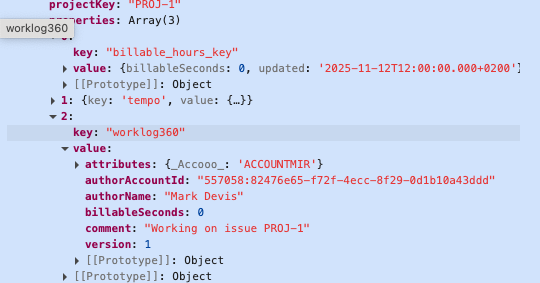
In order for our customers to be able to migrate from Tempo to Worklog360 we have prepared a Python Script which will connect to Tempo API and migrate this information to a format Worklog360 can display. This is done by storing tempo specific information on Jira’s worklog properties object.
An example for Worklog360 property value on a Jira work log after running the script
You may think that instead of adding this information to Worklog property why the app is not updating actual author information on the worklog itself. Unfortunately, Jira REST API doesn’t allow modifying worklog author. Another option may be deleting the original worklog and recreating the worklog using the new information. Since this is a destructive operation, we didn’t want to do this.
Key Points About the Script
-
Utilizes threads for faster worklog updates, crucial for handling large data volumes.
-
Manages concurrency to respect Jira's API rate limits, adjusting request timing to prevent failures.
-
Updates Jira worklog properties with accurate author data from Tempo, ensuring data integrity post-migration.
-
Provides real-time progress updates and color-coded messages for easy monitoring during migration.
How to Use the Script
Script will require you to define some environment variables before running it. These are required to connect Tempo API, Jira API
-
Specify environment variables specified on the below table.
-
Replace
https://your-jira-domain.atlassian.netstring with your actual site. -
Then, run the following command in your terminal:
pip install requests==2.31.0 && pip install tqdm==4.66.1 -
Make sure the Jira user you will be using in the script has: “Browse users and groups” Jira permissions
After these steps you can run the script by running this command python <name_of_the_script>.py
The Script
|
|
|
|---|---|
|
|
Required to connect to Tempo REST API. We will use this token to pull real author, description and attribute values of worklogs from Tempo. To get an API key for Tempo, you need to follow this path in your Jira: Tempo > Settings > OAuth 2.0 Applications |
|
|
Required to connect to Jira REST API. We will use this token to update worklog properties. We will store Tempo specific information on worklog itself as properties. Go to this link and create an API key: https://id.atlassian.com/manage-profile/security/api-tokens |
|
|
Required to connect to Jira REST API. |
import asyncio
import requests
from concurrent.futures import ThreadPoolExecutor
from typing import List, Dict
from tqdm import tqdm
import json

# -----------------------------
# 🔧 Configuration
# -----------------------------
jira_base_url = "https://cloud1.atlassian.net"
tempo_base_url = "https://api.tempo.io/4"
TEMPO_API_TOKEN = "exampleTOKEN"
JIRA_API_TOKEN = "exampleTOKEN"
JIRA_EMAIL = "admin(with Browse users and groups JIRA permission) user email"


tempo_worklog_limit_per_request = 100
initial_tempo_worklog_offset = 0

# -----------------------------
# ⚙️ Helpers
# -----------------------------
def print_with_color(text: str, color_code: str = "32"):
    print(f"\033[{color_code}m{text}\033[0m")

def send_request_with_rate_limit_handling(request_func, **kwargs):
    for attempt in range(5):
        response = request_func(**kwargs)
        if response.status_code == 429:
            print_with_color("⏳ Rate limited. Retrying...", "33")
            import time; time.sleep(2 ** attempt)
        else:
            return response
    response.raise_for_status()
    return response

def build_jira_updated_from_startdate(start_date: str) -> str:
    if not start_date:
        return None
    return f"{start_date}T12:00:00.000+0200"

# -----------------------------
# 📥 Tempo Worklogs
# -----------------------------
def get_tempo_worklogs(offset=0):
    url = f"{tempo_base_url}/worklogs?limit={tempo_worklog_limit_per_request}&offset={offset}"
    headers = {'Authorization': f'Bearer {TEMPO_API_TOKEN}'}
    response = requests.get(url, headers=headers)
    response.raise_for_status()
    worklogs = response.json().get("results", [])
    for worklog in worklogs:
        attributes = worklog.get('attributes', {}).get('values', [])
        worklog['attributes'] = attributes if attributes else None
    print_with_color(f"\nFetched {len(worklogs)} worklogs from Tempo (offset={offset})", "36")
    return worklogs

def get_jira_worklog_ids_from_tempo(worklog_ids: List[str]) -> Dict[int, int]:
    url = f"{tempo_base_url}/worklogs/tempo-to-jira?limit={tempo_worklog_limit_per_request}"
    headers = {'Authorization': f'Bearer {TEMPO_API_TOKEN}'}
    response = send_request_with_rate_limit_handling(
        request_func=requests.post,
        url=url,
        headers=headers,
        json={"tempoWorklogIds": worklog_ids}
    )
    response.raise_for_status()
    results = response.json().get("results", [])
    return {item['tempoWorklogId']: item['jiraWorklogId'] for item in results}

# -----------------------------
# 🧑 Jira User Cache
# -----------------------------
user_cache = {}

def get_jira_user_name(account_id: str) -> str:
    if account_id in user_cache:
        return user_cache[account_id]
    url = f"{jira_base_url}/rest/api/3/user?accountId={account_id}"
    response = send_request_with_rate_limit_handling(
        requests.get,
        url=url,
        auth=requests.auth.HTTPBasicAuth(JIRA_EMAIL, JIRA_API_TOKEN)
    )
    response.raise_for_status()
    display_name = response.json().get("displayName", "Unknown")
    user_cache[account_id] = display_name
    return display_name

# -----------------------------
# 🧱 Jira Worklog Updates
# -----------------------------
def update_jira_worklog_request(issue_id_or_key: str, worklog_id: int, payload: dict, stats=None) -> bool:
    url = f"{jira_base_url}/rest/api/3/issue/{issue_id_or_key}/worklog/{worklog_id}/properties/worklog360"
    response = send_request_with_rate_limit_handling(
        request_func=requests.put,
        url=url,
        auth=requests.auth.HTTPBasicAuth(JIRA_EMAIL, JIRA_API_TOKEN),
        json=payload
    )
    if response.status_code in [403, 404]:
        if stats is not None:
            stats["failed"].append({
                "issue": issue_id_or_key,
                "worklog_id": worklog_id,
                "reason": f"Forbidden or not found: {response.status_code}"
            })
        print_with_color(f"⚠️ Forbidden: Cannot update worklog360 for worklog {worklog_id} (issue {issue_id_or_key})", "31")
        return False
    response.raise_for_status()
    return True

def update_jira_billable_hours_property(issue_id_or_key: str, worklog_id: int, payload: dict, stats=None) -> bool:
    property_key = "billable_hours_key"
    url = f"{jira_base_url}/rest/api/3/issue/{issue_id_or_key}/worklog/{worklog_id}/properties/{property_key}"
    response = send_request_with_rate_limit_handling(
        request_func=requests.put,
        url=url,
        auth=requests.auth.HTTPBasicAuth(JIRA_EMAIL, JIRA_API_TOKEN),
        json=payload
    )
    if response.status_code in [403, 404]:
        if stats is not None:
            stats["failed"].append({
                "issue": issue_id_or_key,
                "worklog_id": worklog_id,
                "reason": f"Forbidden or not found: {response.status_code}"
            })
        print_with_color(f"⚠️ Forbidden: Cannot update billable_hours_key for worklog {worklog_id} (issue {issue_id_or_key})", "31")
        return False
    response.raise_for_status()
    return True

# -----------------------------
# ⚡ Batch Processing
# -----------------------------
async def update_jira_worklogs_in_batch(worklogs: List[dict], jira_mapping: Dict[int, int]):
    executor = ThreadPoolExecutor(max_workers=30)
    stats = {"migrated": 0, "skipped_no_mapping": 0, "failed": []}
    success_worklogs = set()

    async def async_update_property(func, issue_id, worklog_id, payload):
        loop = asyncio.get_event_loop()
        try:
            return await loop.run_in_executor(executor, func, issue_id, worklog_id, payload, stats)
        except Exception as e:
            stats["failed"].append({"issue": issue_id, "worklog_id": worklog_id, "reason": str(e)})
            return False

    tasks = []
    for worklog in worklogs:
        issue_id_or_key = worklog.get("issueKey") or str(worklog["issue"]["id"])
        jira_worklog_id = jira_mapping.get(worklog['tempoWorklogId'])
        if not jira_worklog_id:
            stats["skipped_no_mapping"] += 1
            continue

        # Get displayName from Jira API (cached)
        author_name = get_jira_user_name(worklog["author"]["accountId"])

        payload_worklog360 = {
            "version": 1,
            "authorAccountId": worklog["author"]["accountId"],
            "authorName": author_name,
            "comment": worklog.get("description", ""),
            "billableSeconds": worklog.get("billableSeconds", 0),
            "attributes": {attr['key']: attr['value'] for attr in worklog.get('attributes') or []}
        }
        payload_billable = {
            "billableSeconds": worklog.get("billableSeconds", 0),
            "updated": build_jira_updated_from_startdate(worklog.get("startDate"))
        }

        task = asyncio.gather(
            async_update_property(update_jira_worklog_request, issue_id_or_key, jira_worklog_id, payload_worklog360),
            async_update_property(update_jira_billable_hours_property, issue_id_or_key, jira_worklog_id, payload_billable)
        )
        tasks.append((jira_worklog_id, issue_id_or_key, task))

    with tqdm(total=len(tasks), desc="Migrating Worklogs", colour="green") as pbar:
        for jira_worklog_id, issue_id_or_key, task in tasks:
            success_worklog360, success_billable = await task
            if success_worklog360 or success_billable:
                success_worklogs.add(jira_worklog_id)
            pbar.update(1)

    stats["migrated"] = len(success_worklogs)
    return stats

# -----------------------------
# 🏁 Main
# -----------------------------
def main():
    offset = initial_tempo_worklog_offset
    total_stats = {"migrated": 0, "skipped_no_mapping": 0, "failed": []}

    while True:
        worklogs = get_tempo_worklogs(offset)
        if not worklogs:
            break

        tempo_ids = [w['tempoWorklogId'] for w in worklogs]
        jira_mapping = get_jira_worklog_ids_from_tempo(tempo_ids)

        batch_stats = asyncio.run(update_jira_worklogs_in_batch(worklogs, jira_mapping))

        total_stats["migrated"] += batch_stats["migrated"]
        total_stats["skipped_no_mapping"] += batch_stats["skipped_no_mapping"]
        total_stats["failed"].extend(batch_stats["failed"])

        offset += tempo_worklog_limit_per_request

    # Final summary
    print_with_color("\n🏁 FINAL MIGRATION SUMMARY", "34")
    print_with_color(f"✅ Total migrated: {total_stats['migrated']}", "32")
    print_with_color(f"⚠️ Total skipped (no mapping): {total_stats['skipped_no_mapping']}", "33")
    print_with_color(f"❌ Total failed: {len(total_stats['failed'])}", "31")
    if total_stats["failed"]:
        print_with_color("Sample failed worklogs:", "31")
        for f in total_stats["failed"][:10]:
            print(f" - Issue {f['issue']}, Worklog {f['worklog_id']} → {f['reason']}")

if __name__ == "__main__":
    print_with_color("\nStarting Jira worklog migration...", "34")
    main()
After each batch, you'll see Batch Offset number on your terminal.
Running the script multiple times for the same worklogs is usually safe, as long as you don’t modify the same worklog using Worklog360 app between. At the second run, the script will override the same Worklog360 properties. At the end of the script you will receive msg how many worklogs have been migrated and which one has failed (if there are such).
Once the Migration is over in the Reports section of Worklog360 all worklogs with “Tempo Timesheet” user will have the proper Author and the Tempo worklog billable hours will also be visible in Worklog360. At this point using the BULK EDIT you can apply Rates, change Accouts or Edit Billabel Hours. * Those last edits will not be visible back in TEMPO. We recommend that after the migration you change back the Jira Time Tracker provider to be the default Jira instead of TEMPO. You can do that in JIRA/Settings/Work Item/Time Tracking.
…And this is how you will no longer be stuck with Tempo and can explore any other Time Tracking App in the Marketplace.